Interbank Account Data Sharing (IADS) & Open Application Programming Interface (Open API)

IADS Seamless Account Connectivity
Open API Banking at Your Fingertips

What is Open API?
CCB (Asia) has opened the Application Programming Interface (Open API) to several e-service providers. You may now get the most up-to-date product information and promotion news of CCB (Asia), such as deposit, foreign currency exchange, loans, investment, insurance and other general banking services through the third-party websites and applications at ease!

What is Interbank Account Data Sharing (IADS)?
Interbank Account Data Sharing (IADS) is an initiative introduced by the Hong Kong Monetary Authority under Phase 3 of its Open API Framework. Participating banks can act as both data providers and consumers. With your authorized consent, you can securely and effectively share your account data with selected banks, allowing to offer you more personalized services. For the latest information regarding the program, please refer to the Hong Kong Monetary Authority's website.

Key Features

Feature 1
Provide diversified information channels with the adoption of advanced technology and world-class security guardiance.

Feature 2
A seamless experience for getting the CCB (Asia) product information and applying for the banking products through the third-party websites and applications.

Feature 3
Ensuring secure and efficient sharing of bank account data with other banks.

Application Scenarios

This video gives a brief overview of how customers use banking services on websites or applications of TSP via Open API (Chinese version only).

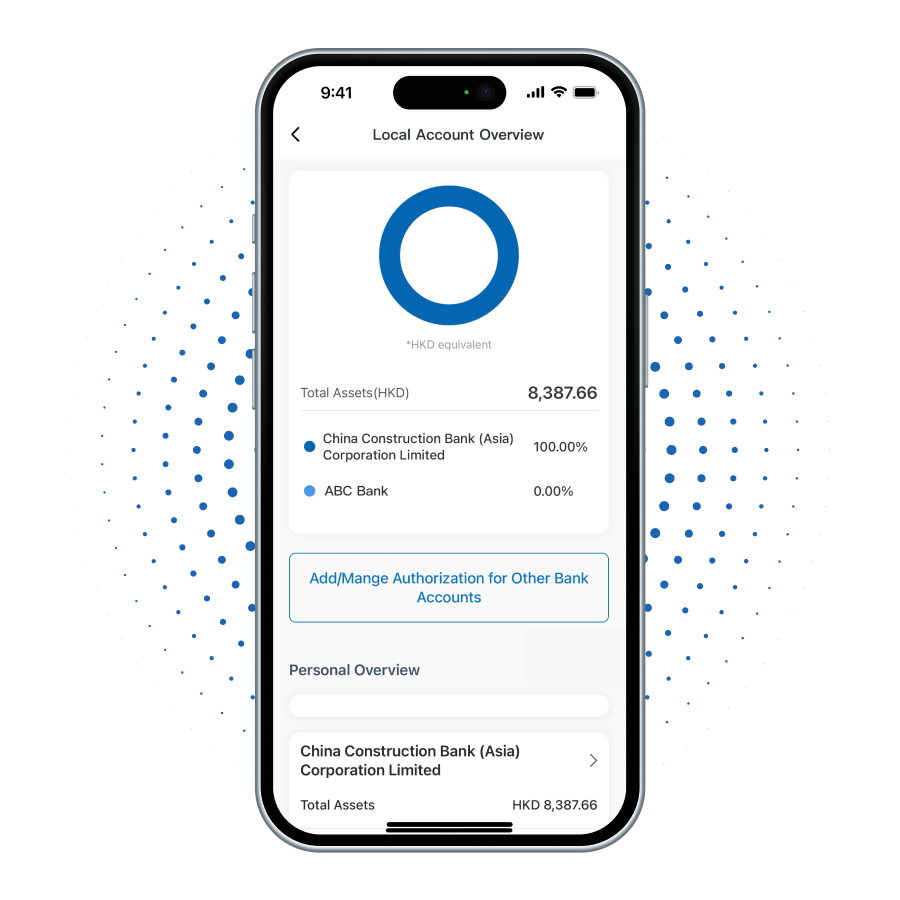
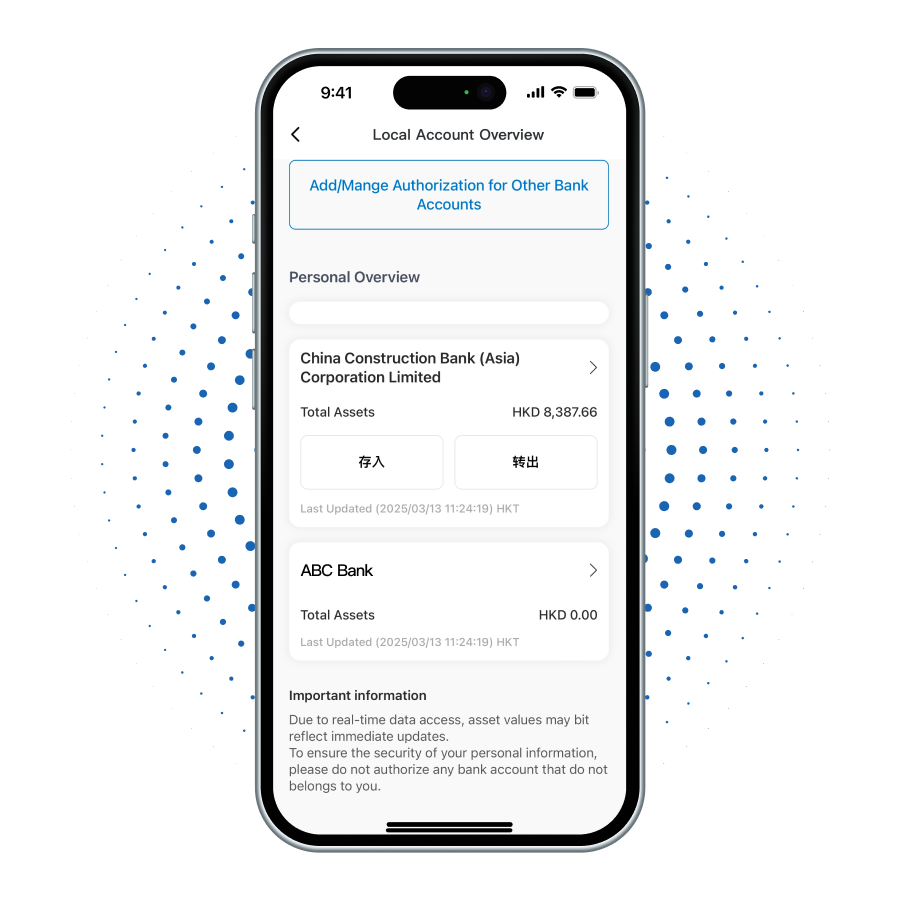
As a data consumer, our bank has launched the Local Account Overview service on our Personal Mobile Banking and Online Banking platforms. After completing cross-bank account authorization, customers can view real-time information of their linked accounts from other banks through this service, enabling them to gain a comprehensive view of their personal assets. To learn more, please refer to the Service Demonstration.

As a data provider, our bank will share the account data of your designated current or savings accounts (in HKD or foreign currency) with the bank of your choice, upon receiving your authorization. If you would like to authorize us to share your account data with your chosen bank, please refer to the Frequently Asked Questions below.
Interbank Account Data Sharing
(IADS) Service Demonstration

Interbank Account
Data Sharing (IADS)
Service Demonstration

new-account-step
new-account-step
new-account-step
new-account-step
new-account-step
new-account-step
new-account-step
new-account-step
new-account-step
new-account-step
new-account-step
new-account-step
1

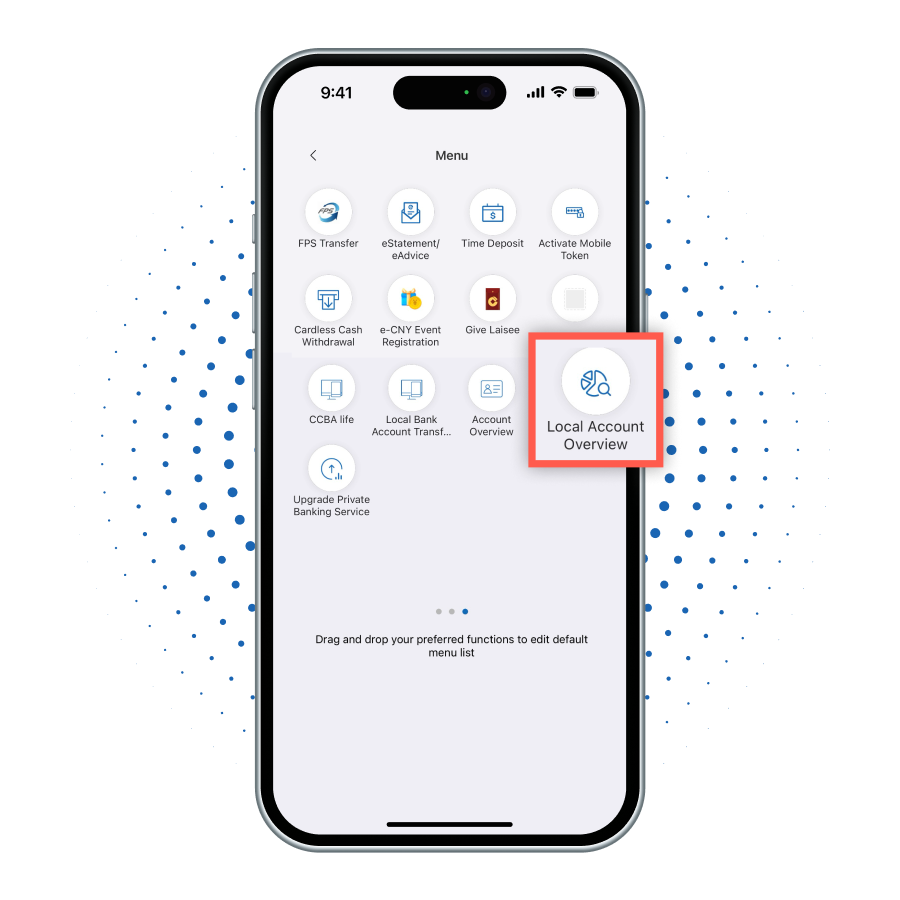
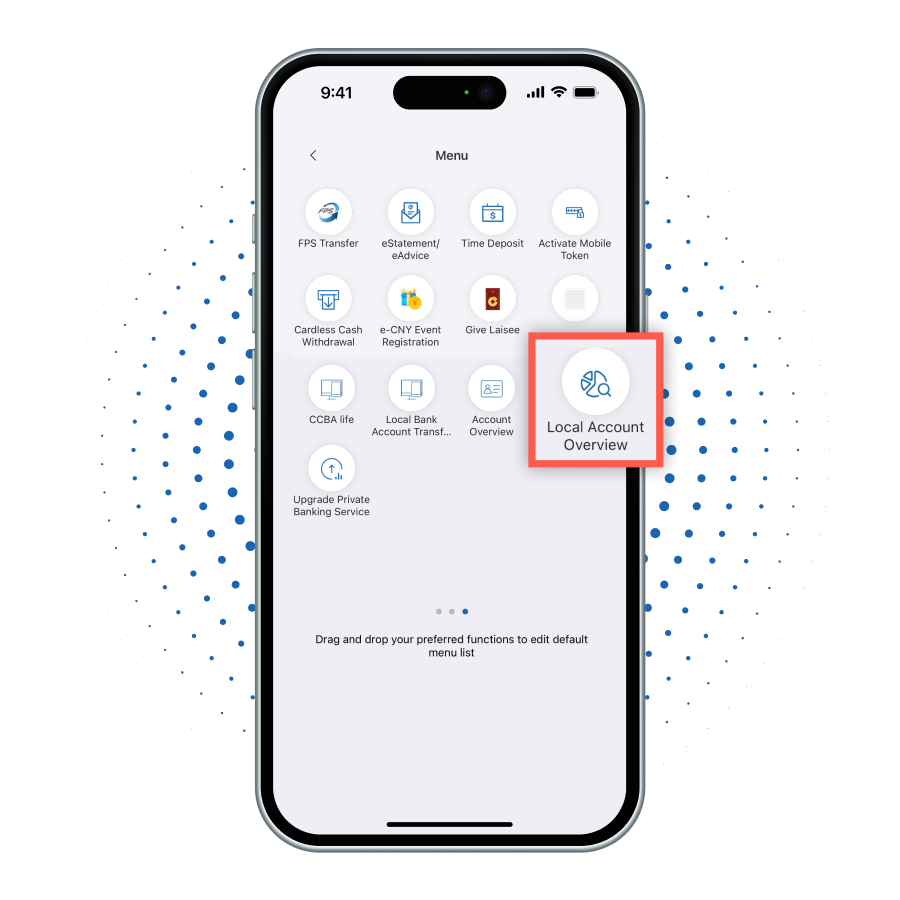
After logging into the mobile banking, select 'Local Account Overview' from the Menu.

2

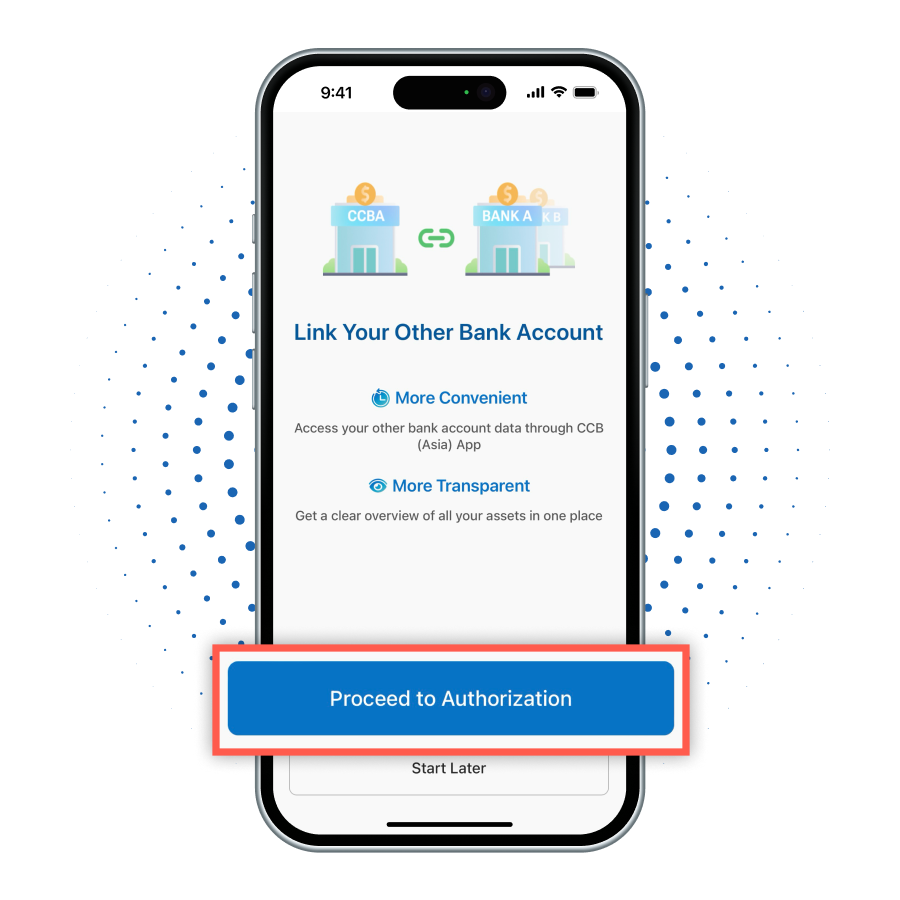
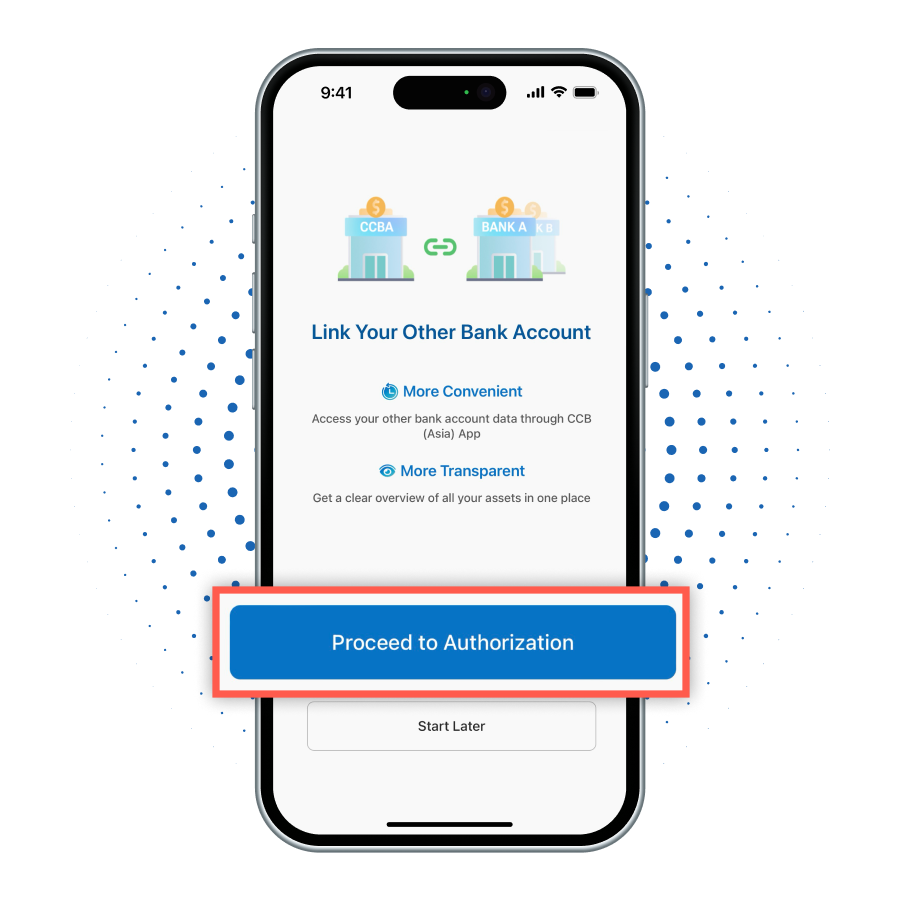
Click 'Proceed to Authorization' to start the authorization process in Local Account Overview main page.

3

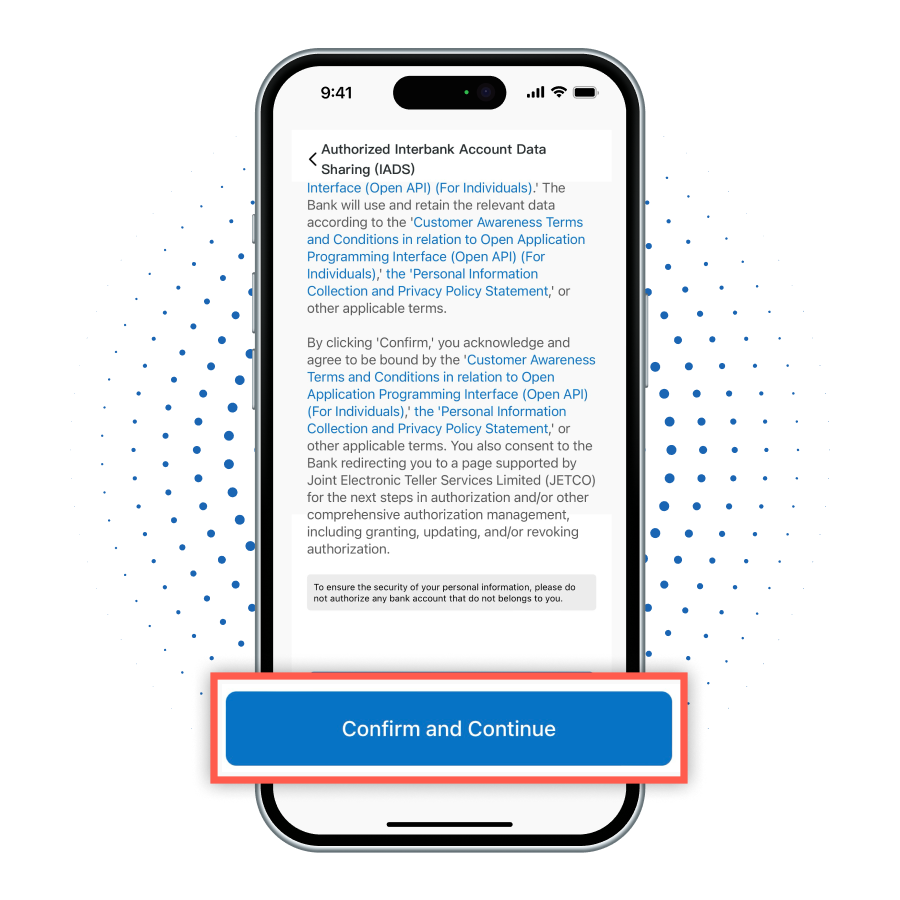
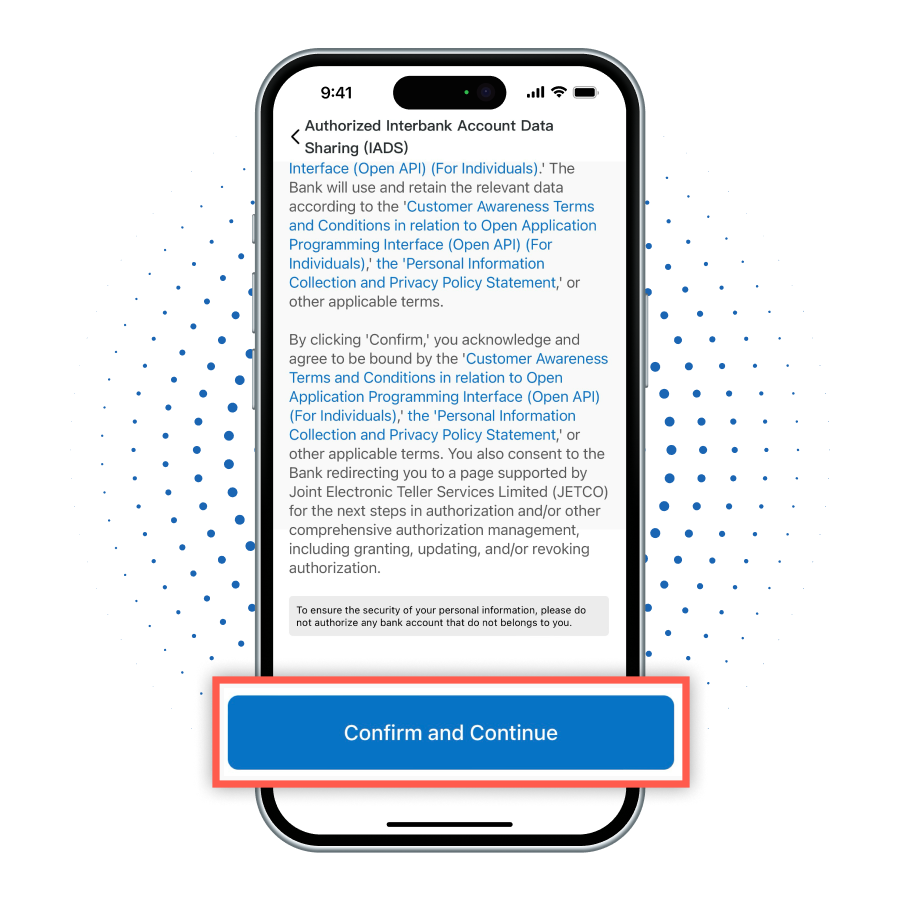
Click 'Confirm and Continue' redirected to the JETCO Portal page for authorization.

4

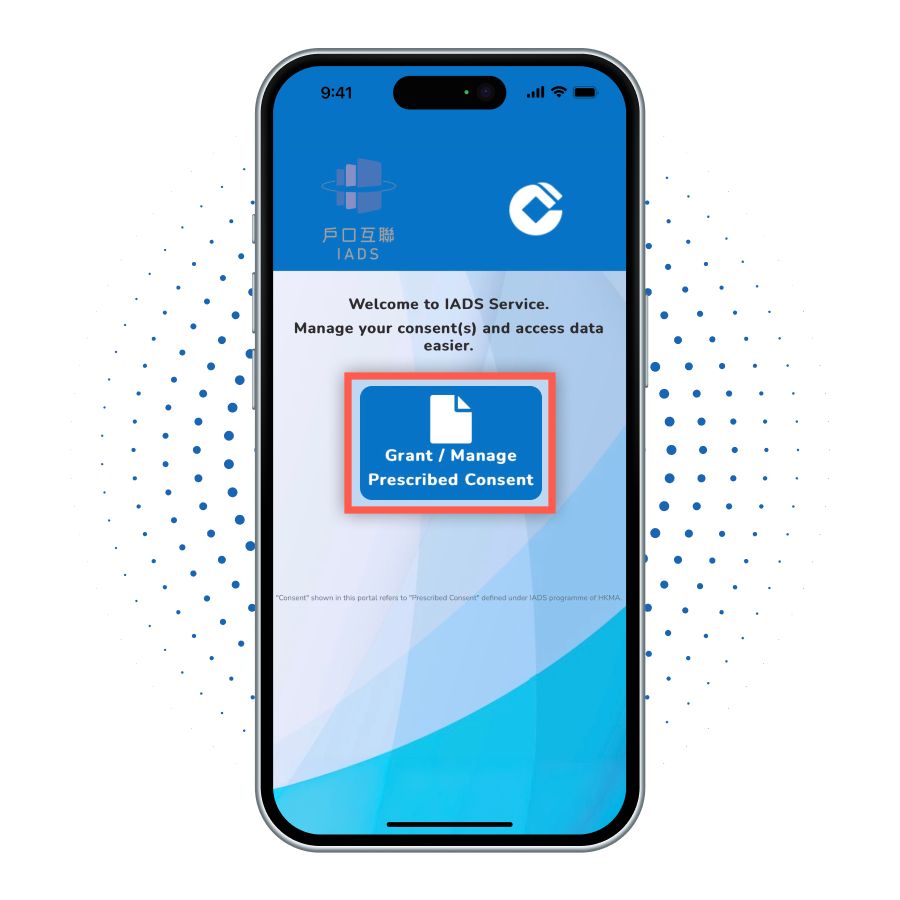
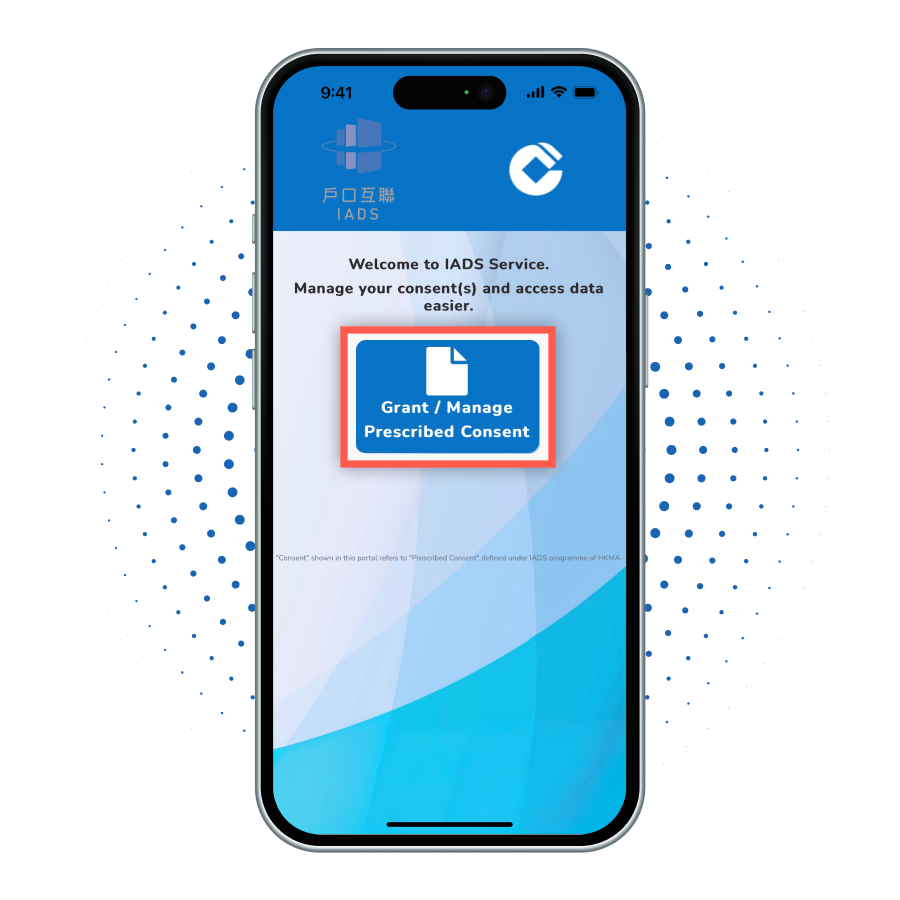
Click 'Grant/Manage Prescribed Consent'.

5

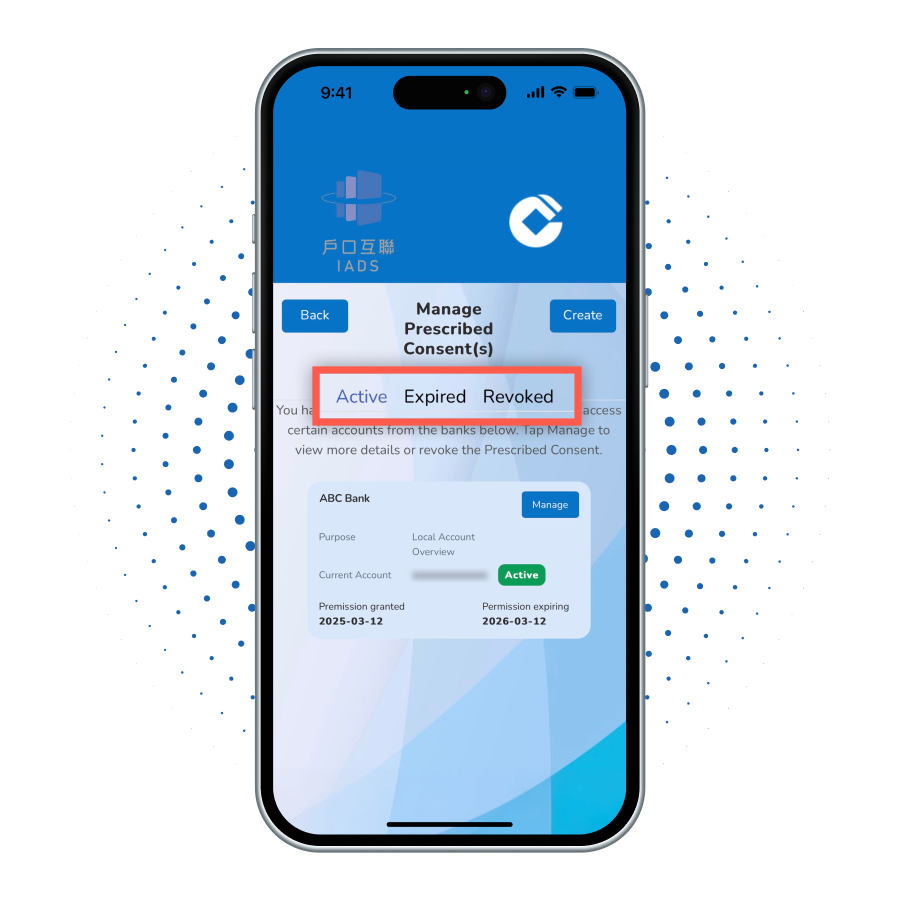
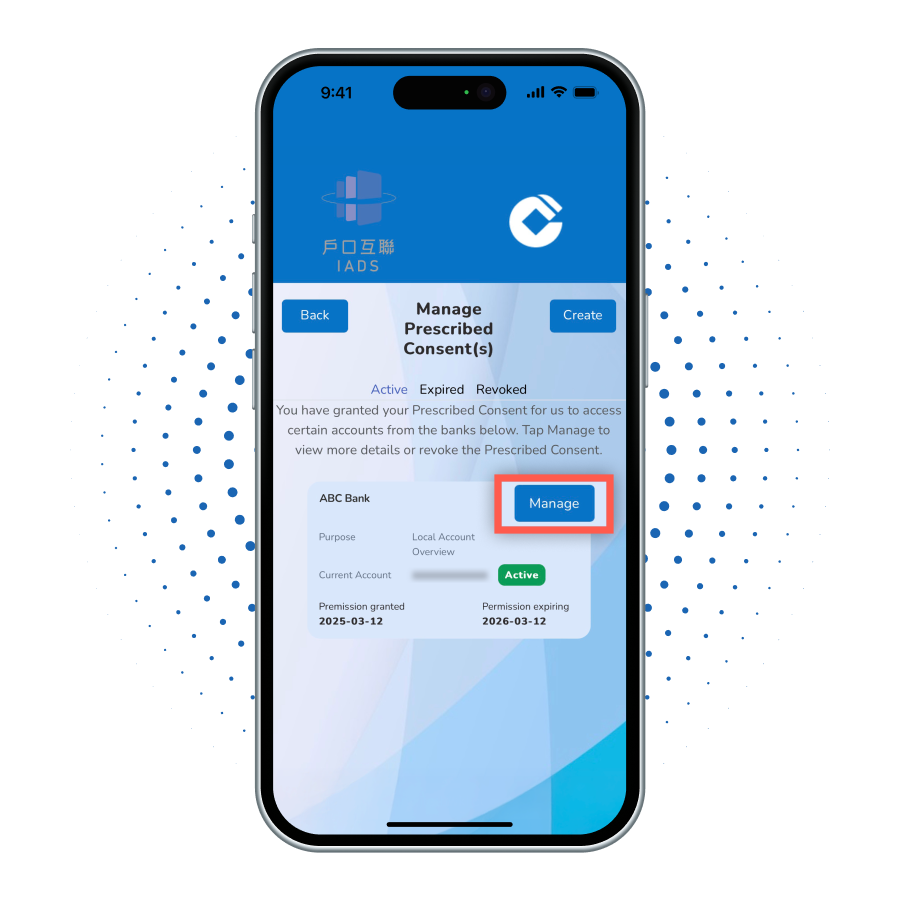
Users can review and manage active, expired, and revoked consents on this page.

6

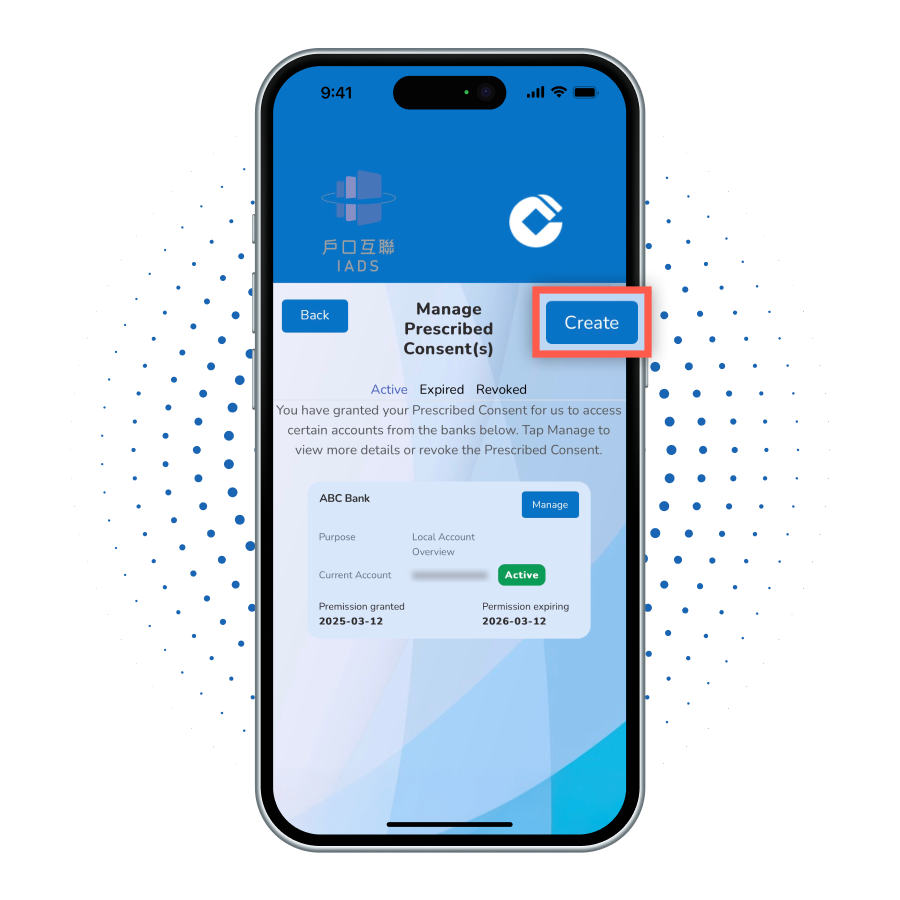
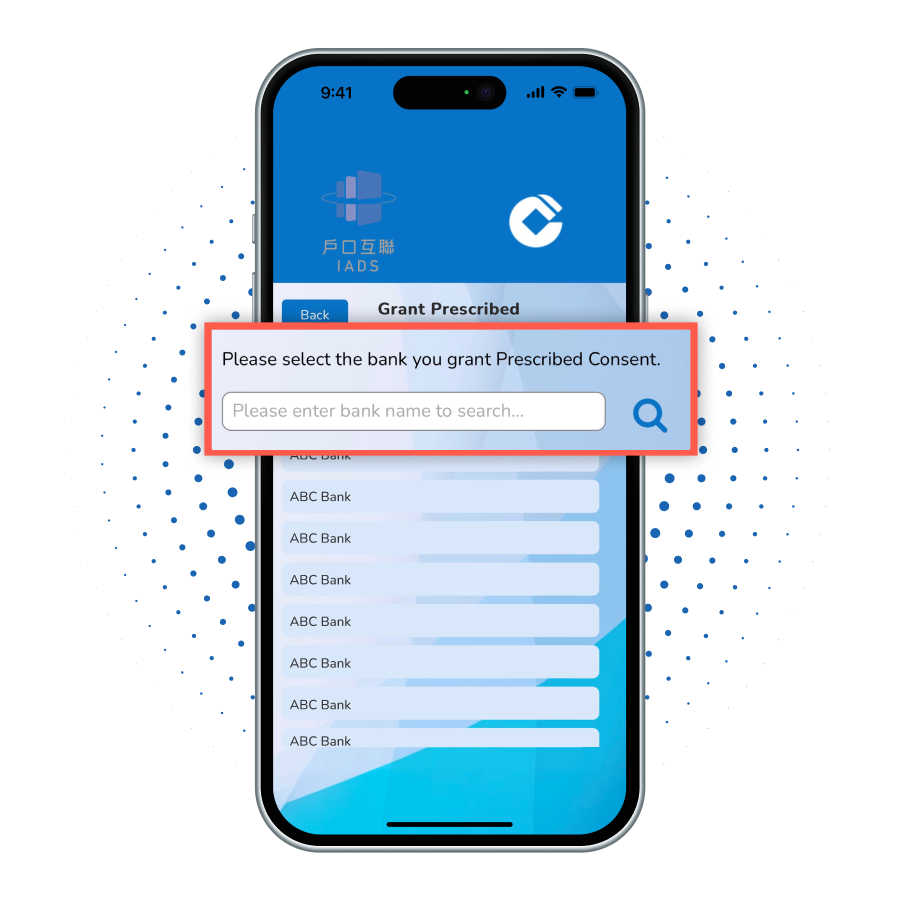
On the Consent Management page, click 'Create' to add new consent;

7

Search/Select the bank you will authorize;

8

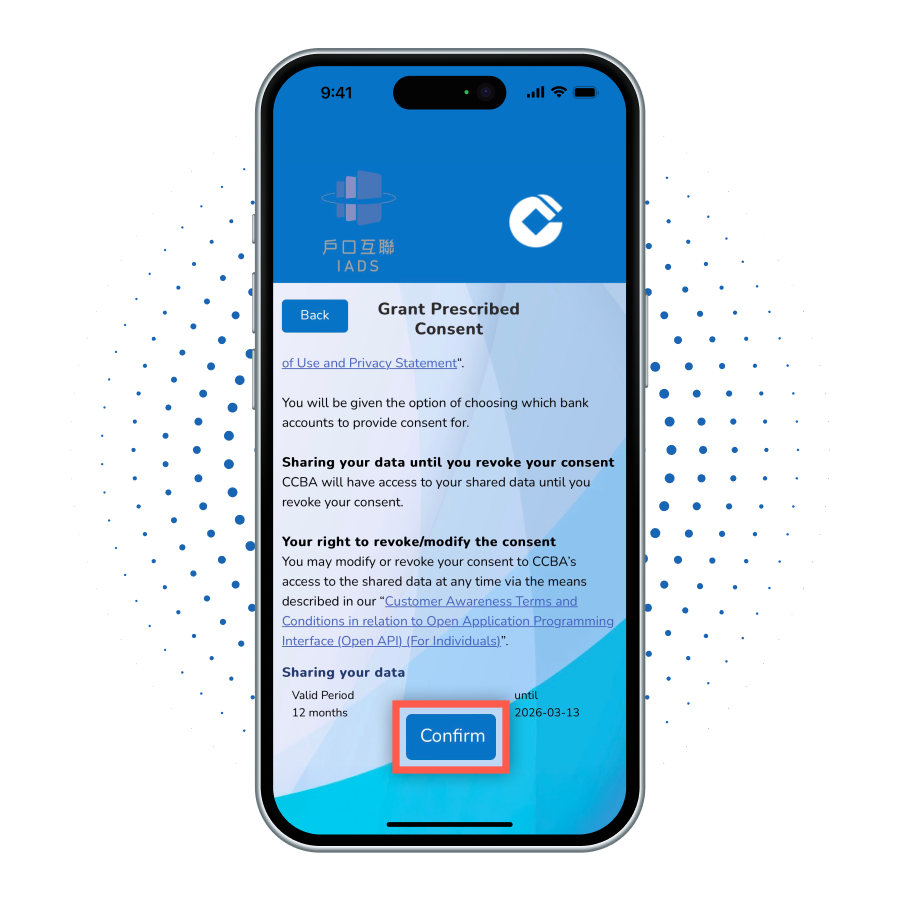
After reading the terms, click 'Confirm';

9

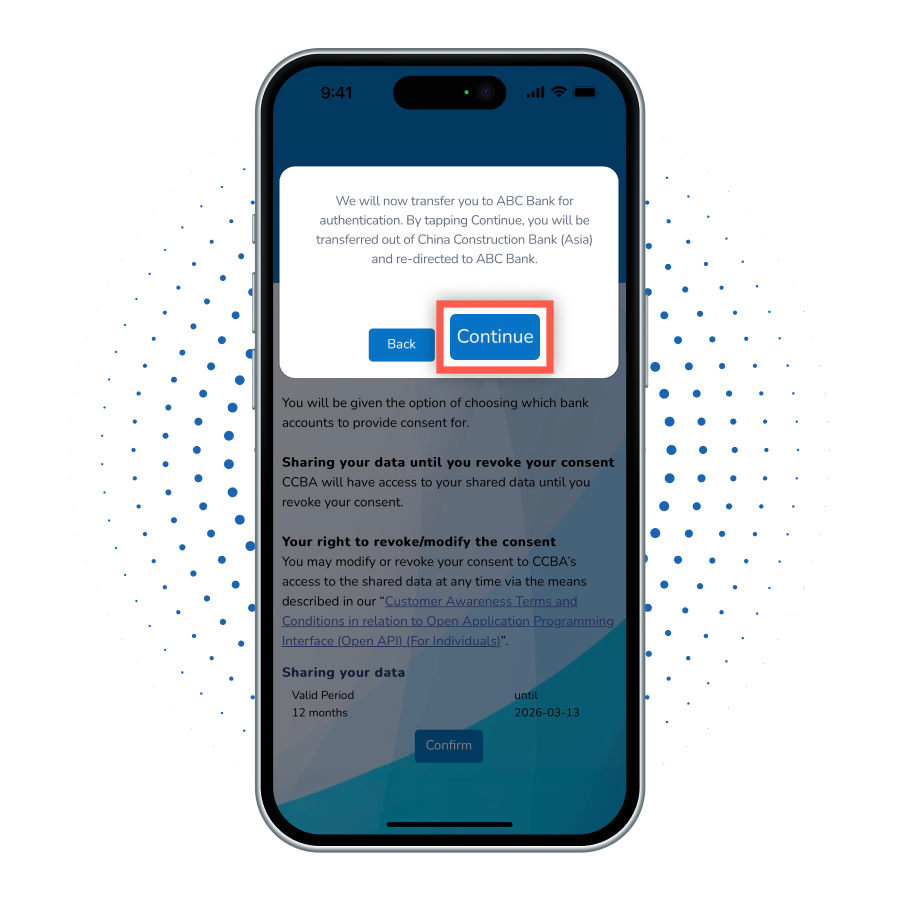
Click 'Continue' to be redirected to the bank you want to authorize for verification.

10a

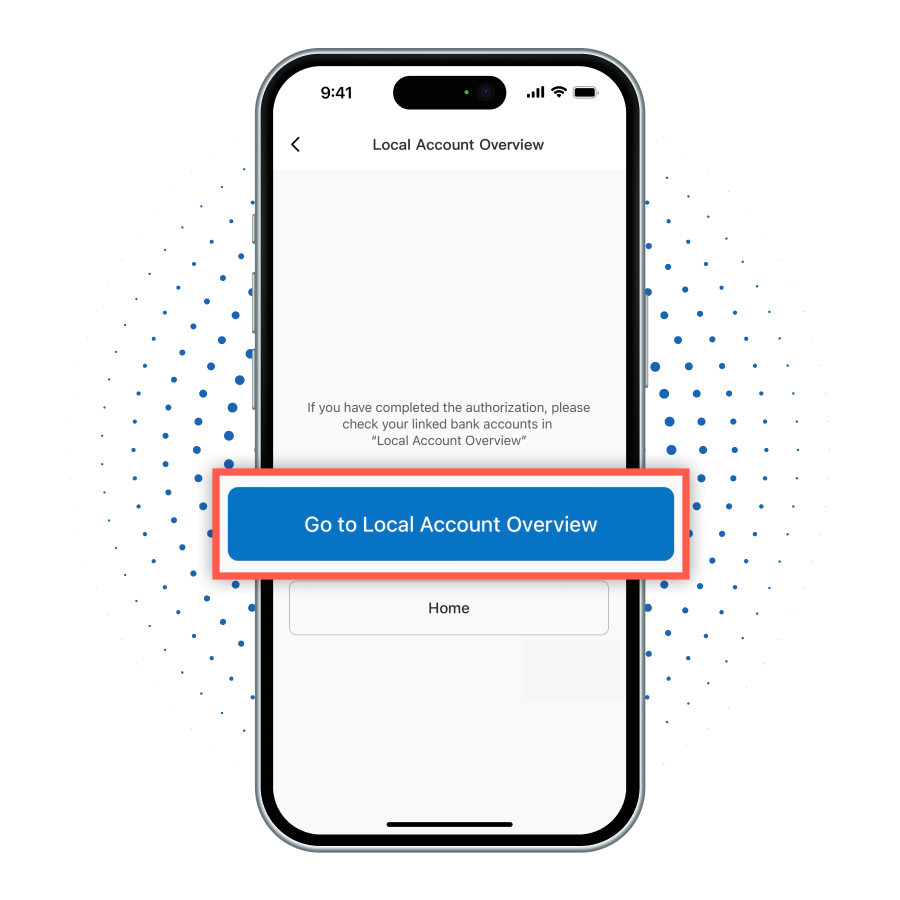
After completing the entire authorization process, you can click 'Go to Local Account Overview' to view the details of the linked bank accounts.

10b

After completing the entire authorization process, you can click 'Go to Local Account Overview' to view the details of the linked bank accounts.

10c

After completing the entire authorization process, you can click 'Go to Local Account Overview' to view the details of the linked bank accounts.

new-account-step
new-account-step
new-account-step
new-account-step
new-account-step
new-account-step
new-account-step
new-account-step
new-account-step
new-account-step
1

After logging into the mobile banking, select 'Local Account Overview' from the Menu.

2

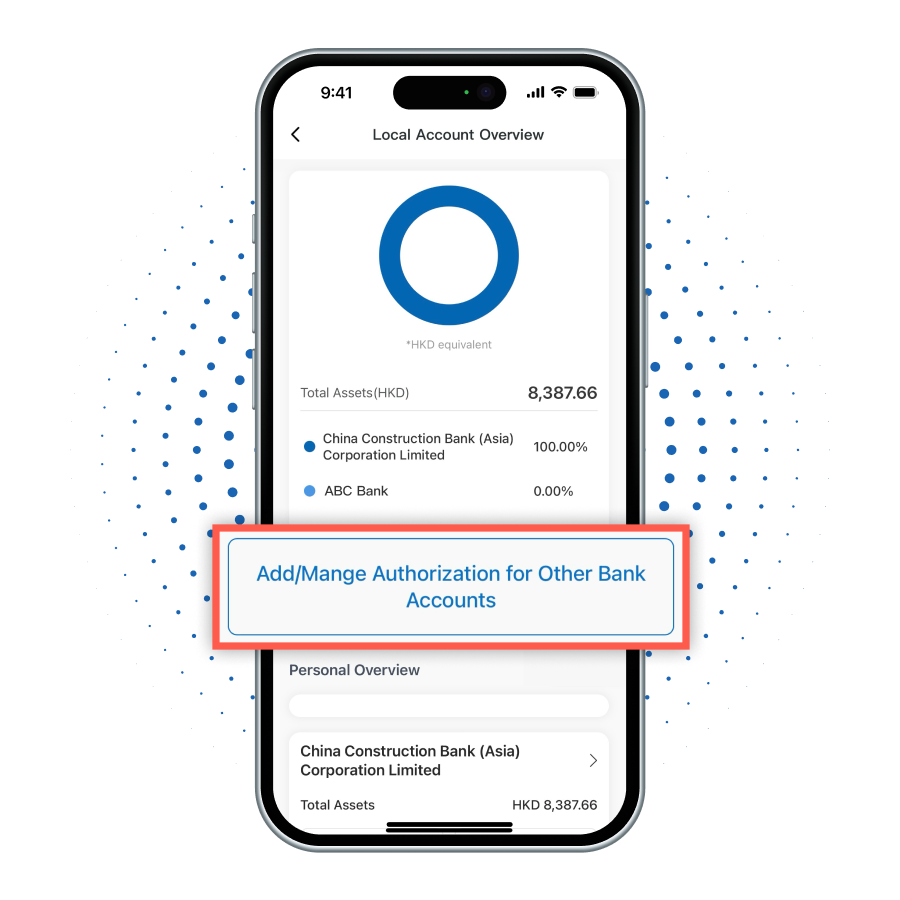
After entering the Local Account Overview function page, click 'Add/Manage Authorization for Other Bank Accounts' to start managing authorizations.

3

Click 'Proceed to Authorization' to start the revocation process.

4

Click 'Confirm and Continue' redirected to the JETCO Portal page for authorization.

5

Click 'Grant/Manage Prescribed Consent' .

6

To revoke consent, click the 'Manage' button;

7

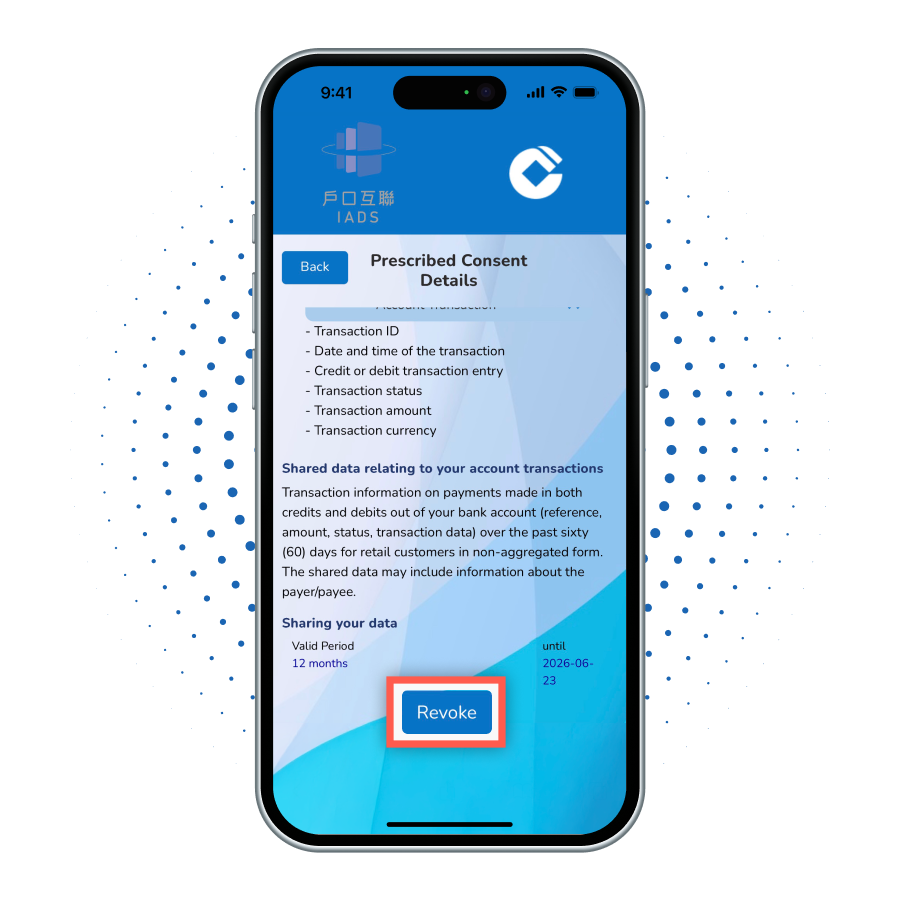
After reading the terms and conditions, click 'Revoke';

8

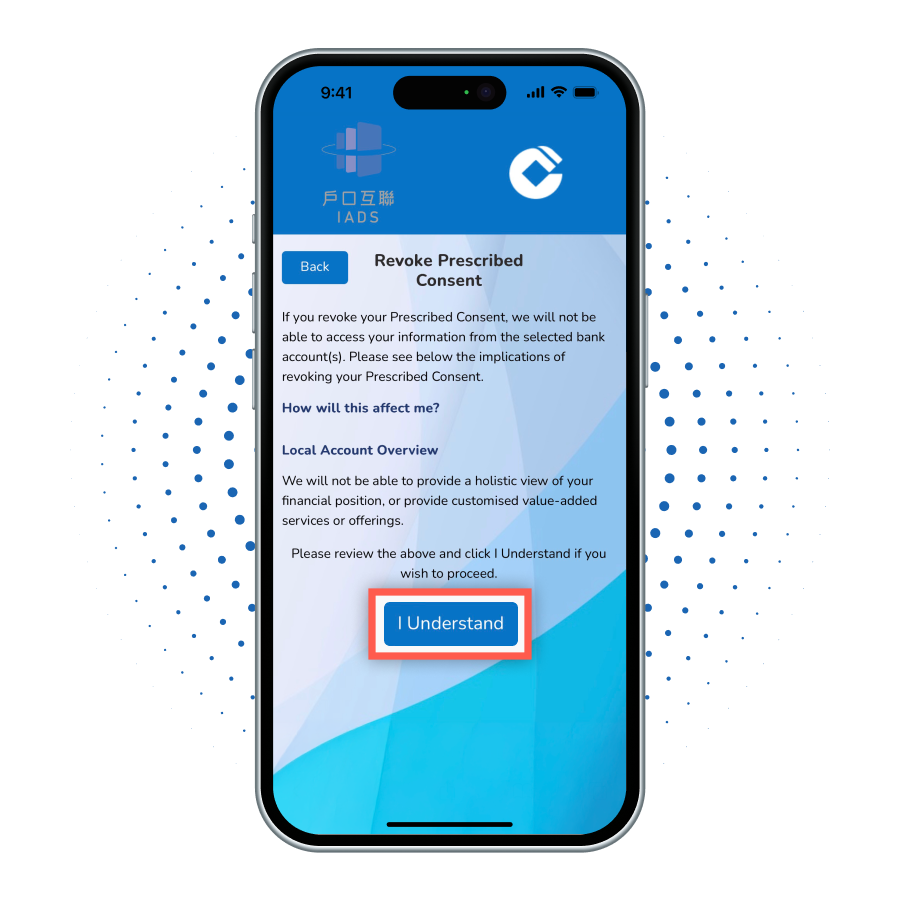
After reading the terms and conditions, click 'I Understand';

9

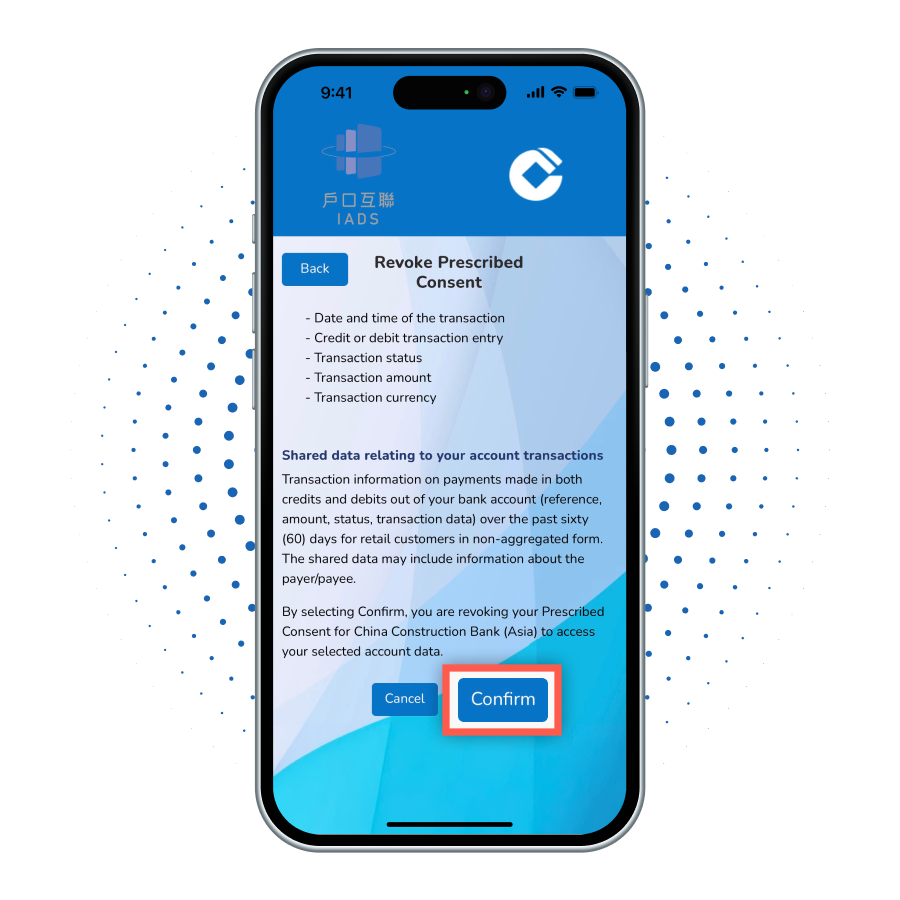
Click 'Confirm' to revoke the consent;

10

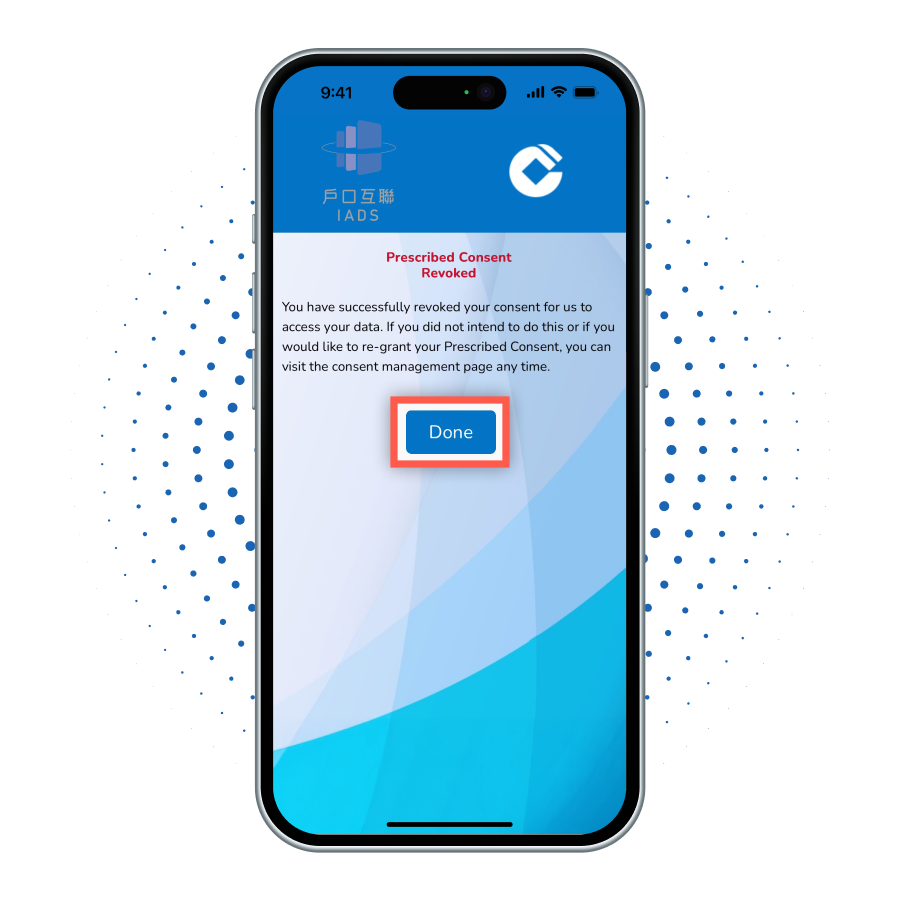
Successfully revoked consent.

Frequently Asked Questions

Who can use the service under Interbank Account Data Sharing (IADS) scheme?
In order to use this service, you need to:
  • Register for our mobile banking or online banking services; and
  • have a valid mobile phone number registered with the Bank; and
  • hold at least one eligible Current or Savings account with the Bank
What kind of data will be shared after having my consent?
With your consent, only following Current or Savings account data (in HKD or foreign currencies) will be shared to your selected banks during your consent period:
  • Account Availability
  • Account Status
  • Account Balances
  • Account Transactions
Your login credentials will not be shared to other banks.
How long is the consent period for data sharing?
The consent period is one year. It will be reviewed from time to time, subjected to HKMA's latest guideline or announcement.
How can I grant consent to selected bank for account data sharing?
You may refer to the following steps to grant consent for us to share your account data to your selected bank:
  1. Log in to your online banking account with bank you wish to authorize to initiate the authorization process and verify your authorization details.
  2. You will be redirected to our online banking to complete the login and authorization process.
  3. You will then be directed to our consent management platform, supported by a third-party service provider, to confirm the account data to be shared and review the authorization terms to complete the data sharing authorization process.
  4. Once completed, you will receive a confirmation SMS from us regarding the creation of the consent.
How can I authorize the bank to obtain account data from selected bank via online banking or mobile banking?
You can authorize our bank to access your designated cross-bank account data by following these steps:
  1. Log in to your CCB(Asia) Mobile Banking or Online Banking platform, navigate to the "Local Account Overview Service" page, and read and agree to the service terms.
  2. You will be directed to our bank's Consent Management Platform (supported by a third-party service provider) to complete the following steps:
  3. Select the specific bank(s) you wish to link. You will then be redirected to the designated bank's platform to confirm the authorization scope and agree to the data sharing terms.
  4. Once authorized, you can view your consolidated local account overview directly within CCB(Asia) Mobile Banking or Online Banking.
To learn more, please refer to the Service Demonstration.
Under what scenario will other banks be able to view my data?
We will only share your account data to your selected banks within the consent period. You can always revoke any active consents to stop data sharing instantly.

Cooperating Partners

Centaline Mortgage Broker Limited is a member of the Centaline Group, established in 1997 and has been committed to provide customers with the high quality mortgage referral services. The professional mortgage advisory team has a comprehensive grasp of the mortgage market information and strive to introduce the most favorable mortgage plans to clients.
Company name: Centaline Mortgage Broker Limited
Principal place of business:Hong Kong
Business nature:Online and offline mortgage loan referral service
Mailing address:Rooms 601&616, 6/F, Wharf T&T Centre, Harbor City, 7 Canton Road, Tsim Sha Tsui, Kowloon
Company phone number:852- 2889-2886
Company fax number:852- 2811-2121
Company e-mail address:cmb@mail.centanet.com
Company Website:https://www.centamortgage.com
Services/Products offered by TSP in partnership with Bank: Process mortgage loan application request
Distribution channels: Via company website and application
Website:https://www.centamortgage.com
More Info
ET Net
Services/Products offered by TSP in partnership with Bank:Deposits, Loans, Foreign Currency Exchange and Other Banking Services
mReferral Mortgage Brokerage Services is a joint venture of CK Hutchison Holdings Limited and Midland Holdings Limited. Partnering with over 70 financial institutions and offering more than 100 mortgage plans, mReferral is dedicated to provide comprehensive services which help customers choosing the suitable mortgage plans hassle-free.
Company name: mReferral Mortgage Brokerage Services
Principal place of business: Hong Kong
Business nature: Online and offline mortgage loan referral service
Mailing address: 17/F, OTB Building, 160 Gloucester Road, Wan Chai, Hong Kong
Company phone number: 852- 3196-6688 / 852- 3196-6600
Company fax number: 852- 3196-6678
Company e-mail address: info@mReferral.com
Company website: https://www.mreferral.com
Services/Products offered by TSP in partnership with Bank: Process mortgage loan application request
Distribution channels: Via company website and application
Website: https://www.mreferral.com
More Info
Ricacorp Mortgage Agency Limited has been established in 1999 and has collaborated with over 50 banks and financial institutions, and provides one-stop mortgage referral services including free referrals, personalized advice on mortgage choices and end-to-end mortgage application service.
Company name: Ricacorp Mortgage Agency Limited
Principal place of business: Hong Kong
Business nature: Online and offline mortgage loan referral service
Mailing address: Room 1805, 18/F, Olympia plaza, 255 King's Road, North Point, Hong Kong
Company phone number: 852- 2836-6121 / 852- 2836-6183
Company fax number: 852- 2117-1795
Company e-mail address: mortgage@ricacorp.com
Company website: https://www.ricamortgage.com
Services/Products offered by TSP in Partnership with Bank: Process mortgage loan application request
Distribution channels: Via company website and application
Website: https://www.ricamortgage.com
More Info
*Update as of Mar 2024

The above links bring you to a third party site designated by China Construction Bank (Asia) Corporation Limited (the "Bank").

For your surfing on the third party site, the Bank does not represent or confirm the following (or any of them):

  1. that there will be no delay, failure, error or omission or loss of information in transmission;
  2. that no viruses or other contaminating or destructive properties will be transmitted; and
  3. that no damage will occur to your mobile handset and/or computer system.

You are solely responsible for the following:

  1. adequate protection and backup of data and equipment; and
  2. undertaking reasonable and appropriate precautions to scan for computer viruses and other contaminating or destructive properties. 

For more information regarding the Open API service, please refer to the above Related Links. The service listed above is subject to the related terms and conditions of the service, you may refer the terms and conditions from the above Related Links respectively.